 |
| http://funwebpk.blogspot.com/p/computer-tip.html |
NTFS Security
NTFS permissions can be used to secure files and folders on an NTFS Partition. Unlike share permissions, NTFS permissions can be assigned to individual files as well as folders. Permissions can be assigned to individual users or groups of users. NTFS permissions apply to the local machine as well as the network.
 |
| http://funwebpk.blogspot.com/p/computer-tip.html |
NTFS permissions differ slightly for files and folders. Here is a list of the permissions available:
NTFS Folder Permissions
Read – Allows a user to see the files and subfolders in a folder, and to view folder properties.
Write – Allows a user to create new files and folders within the folder, change folder attributes and view folder properties.
List Folder Contents – Allows a user to view the contents of the folder.
Read and Execute – Allows a user to read the contents of a folder and Traverse Folders.
Modify – Allows a user to delete and modify the contents of a folder, and enables Read/Execute and Write permissions.
Full Control – Allows a user to modify permissions and to take ownership.
NTFS File Permissions
Read – Allows a user to read a file and view its properties.
Write – Allows a user to overwrite a file, change attributes, and view ownership and permissions.
Read and Execute – Allows a user the right to run applications and read a file.
Modify – Allows a user to modify and delete a file and also allows Read/Execute and Write Permissions.
Full Control – Gives the user full-control over a file, allowing the user to modify permissions and take ownership.
Permission Inheritance
By default all files and folders inherit permissions from their parent. If Read Permission is allowed to the parent folder, all child files and folders below it will also be given Read Permission. This is known as Permission Inheritance.
Windows also allows you to block Permission Inheritance, and assign permissions to files and folders individually.
Taking Ownership
Every file and folder created has an owner. This owner is called the creator owner. The owner of an object can deny access to other users including the Administrator. Fortunately the administrator can take ownership of any file or folder on the computer and regain access.
To configure folder permissions right-click on the relevant folder.
Select Properties.
Select Security.
The Access Control List (ACL) for the folder is displayed. Click on Add to add a new user to the list.
Type in the name of the user, e.g. Pauline Potter.
Click on OK to continue.
The user Pauline Potter has been added to the ACL and has been given the Read & Execute and List Folder Contents permissions.
As well as securing folders, NTFS can also secure individual files. Right-click on the file to configure file permissions.
Select Properties.
Select the Security Tab.
Notice that this file has inherited all the permissions of its parent. Highlight the user Pauline Potter.
…and select the Deny Full Control Permission. N.B. Similar to share permissions, the Deny permission will always take precedence.
Pauline Potter has now been denied access to the file. Click on Advanced to view the advanced options for this file.
The Permissions tab allows you to fine-tune permissions. To view the special permissions available for this file click on Add.
…and specify a user.
Click on OK.
A list of permissions are shown which allows an administrator to fine-tune access to the file or folder.
The owner tab displays the owner of the file. Users with the right to take ownership can take control of the file from here.
The Effective Permissions page can be used to determine what level of access a user or group will have to this file.
For example, the user Pauline Potter has no access to the file. Even though she has read and execute permission to the parent folder.
The user will receive an error message when attempting to open the file.
Copying and Moving Files on the same Partition.
The follow rules should be remembered when moving or copying files and folders. A new file or folder automatically inherits permissions from its parent. When moving a file on the same NTFS partition, the file will keep its original permissions, no matter where it is placed. When copying a file on the same NTFS partition, a new version of the file is made, so it will inherit the permissions of its parent.
Moving files between folders within a NTFS partition
When moving a file from one folder to another, the file keeps its original permissions. This is because no new resource is made; it is merely moved.
Copying Files Between Folders
When copying a file from one folder to another, the file inherits the permissions of its parent. This is because you are making a new version of the file.
Copying and Moving Files and Folders to another partition.
When copying or moving files and folders to another NTFS partition, a new resource is created, therefore the file/folder will inherit permissions from its parent.
When copying or moving files and folder to a non-NTFS partition, the file/folder will lose all of its attributes.
________________________________________________________________________
 |
| http://funwebpk.blogspot.com/p/computer-tip.html |
Introduction to Dfs
In most of today’s large networks there are many shared resources such as files and folders. The task of locating files and folders can be daunting especially on a large network with many different file servers.
 |
| http://funwebpk.blogspot.com/p/computer-tip.html |
For example, if there was more than one file server in a company, the user would need to know which server a specific folder is located on. This can become difficult when shared folders are scattered throughout the network. Fortunately, Windows Server provides a solution known as the Distributed File System (Dfs). A Dfs server makes all folders appear as if they are located on one machine. All the user needs to know is where the Dfs folder is located. All other folders on the network appear to be located inside the Dfs folder.
The Dfs folder is accessed like any other shared folder. All other folders appear to be located inside the Dfs share (Dfs Root). When a user opens a folder he/she is automatically redirected to the right server. The folders inside the Dfs Root are known as Dfs Links.
There are two different types of Dfs, domain-based and stand-alone...
Stand-Alone Dfs
When creating a Dfs root folder, you have the option of establishing either a stand-alone Dfs root or a domain-based root. Stand-alone Dfs structures can be installed on either workgroup or domain servers. They don’t make use of Active Directory. . Stand-alone Dfs roots cannot make use of Active Directory Replication. However, because they are simpler to set up and manage, they are ideal in workgroup environments that don’t utilise the Active Directory.
Domain-Based Dfs
Domain-Based Dfs structures can only be used in Active Directory domains. Unlike Stand-alone, Domain-Based Dfs can make use of Active-Directory replication and thus can be fault-tolerant. In a domain Dfs root, multiple servers can be used to control the Dfs namespace. The Dfs namespace is stored in the Active Directory, eliminating a single point of failure. Dfs is replicated using Active Directory replication. Fault-tolerant roots must be located on NTFS 5.0 partitions. The individual Dfs links can also exist on multiple machines, allowing for fault tolerant shared folders. Fault tolerance is such that the user can be unaware of considerable carnage to the system as a whole.
_________________________________________________________________________________
_________________________________________________________________________________
 |
| http://funwebpk.blogspot.com/p/computer-tip.html |
Windows XP Server 2003 Overview
In September 2001 Microsoft released an upgrade to Windows 2000 Professional called Windows XP Professional. Windows XP comes in four variants, Windows XP Professional, Windows XP Home Edition, Windows XP Media Centre Edition and Windows XP Tablet PC Edition. Unlike Windows XP Professional, Windows XP Home Edition has limited networking support and is designed solely for home users.
Windows XP Professional offers all of the features of Windows 2000 with many improvements. Windows XP Professional can easily integrate into existing Windows 2000 networks.
Windows XP Professional offers all of the features of Windows 2000 with many improvements. Windows XP Professional can easily integrate into existing Windows 2000 networks.
 |
| http://funwebpk.blogspot.com/p/computer-tip.html |
In April 2003 Microsoft released the Microsoft Windows Server 2003 family as an upgrade to Windows 2000 Server. Windows Server 2003 offers improvements over Windows NT 4.0/2000 server products. These include many security and reliability enhancements.
Windows XP/Server 2003 represents Microsoft’s shift towards the more stable and secure NT kernel. Windows Server 2003 provides enhanced security and control over networks using a feature called Active Directory. This enables companies to reduce running costs and improve work performance.
Active Directory
Active Directory is a fundamental features of Windows 2003 domains. Active Directory is essentially a detailed database containing information about every object on the network. These objects include computers, users, groups, printers and even shared folders.
This feature might seem of little importance until you look at how this information is organised. Active Directory can group objects and place restrictions upon them, for example a group of users might be restricted from using the control panel. Essentially every object can be controlled and similar objects may be grouped into manageable units. As you will later learn Active Directory greatly simplifies network administration.
IntelliMirror
Windows 2003/XP networks use a feature called IntelliMirror. IntelliMirror allows users to move freely around the network whilst maintaining their own settings, preferences, applications and documents.
For example a user’s desktop wallpaper will follow him from machine to machine. The benefits of IntelliMirror and Active Directory can only be fully utilised on Windows 2000/2003/XP networks.
Enhanced User Interface
Windows XP has an enhanced user interface where many common tasks are grouped into easy to find locations. This makes Windows easier and more pleasant to use.
The Microsoft Management Console
Windows XP/2003 also provides a utility called the Microsoft Management Console (MMC). The MMC provides a single, consistent interface for all aspects of administration. Applications built for Windows 2003 such as Exchange Server also use the MMC. The MMC can also be used to manage other machines on the network running Windows 2000/2003 and XP. This eases the job of the Administrator who doesn’t have to present himself physically at each machine, thus improving response times and reducing the general administrative load.
Remote Desktop Connection
 |
| http://funwebpk.blogspot.com/p/computer-tip.html |
Internet Information Services
Windows Server 2003 ships with Internet information Services v6.0 (IIS). IIS allows a computer to securely host web based services such as Web and FTP Sites. Unlike Windows 2000, IIS is not installed by default on Windows Server 2003. Windows XP Professional also includes a limited version of IIS that can host a single Web or FTP site.
Storage Options
Windows Server 2003 provides a feature called Shadow Copy. This feature stores point-in-time versions of files in network shares. This allows an administrator to view or recover folder contents as they existed at certain points in time. Windows XP/2003 allows a user to directly copy files to a CD-R without the use of any third-party CD-Burning application.
ClearType Support
Windows 2003/XP supports anti-aliased fonts using the Microsoft Cleartype technology. With Cleartype technology text becomes sharper and brighter, especially on Laptop displays.
Microsoft Windows Server 2003 Overview
As a network administrator you will need to know which product to use in a certain situation. This is important as the cost of different Windows Server 2003 OS’s differs considerably.
Windows Server 2003 Web Edition; Designed solely as a Web Server.
Cannot function as a Domain Controller. Can act as a File/Print or Web server
Cannot function as a Domain Controller. Can act as a File/Print or Web server
Windows Server 2003 Standard Edition; Supports Active Directory. Used in small to medium environments. Ideal for File and Print services
Windows Server 2003 Enterprise Edition; Supports Active Directory. Used in large organizations. Ideal for Application/Web servers
Windows Server 2003 Datacenter Edition; Supports Active Directory. Used in very large organizations. Ideal for Database Servers (SQL)
Windows 2003/XP Capabilities
Each version of Windows Server 2003 has varying capabilities. Below is a list of those capabilities that may be supported in one version but not in another.
- Network Load Balancing
- Clustering
- Symmetric Multiprocessing (SMP)
- Pre-emptive Multitasking
- Remote Access
Network Load Balancing
 |
| http://funwebpk.blogspot.com/p/computer-tip.html |
If a machine fails, no clients will be connected to it until it is restored. The service to the client remains unimpaired throughout. As the client may connect to one of the other machines
Clustering
Clustering means having more than one server dedicated to running a particular application. This is only supported in Windows Server 2003 Enterprise Edition and Windows Server 2003 Datacenter Edition.
There are two types of clustering:
1. Active/Active
2. Active/Passive
1. Active/Active
2. Active/Passive
Active/Passive Clustering
In Active/Passive Clustering, One machine is running an application, while the other sits quietly watching it. In this format, all machines in a cluster are connected to an external hard-drive. The fact that the passive server merely waits in case of a failure, this can be a very expensive implementation. If the active machine fails, the passive machine takes over the running of the application from the failed machine. This is known as Redundancy.
Active/Active Clustering
Here, both machines are running different applications. However each machine constantly monitors the other. If one of the servers fail, the other machine will take over whatever application the failed machine was running providing fault tolerance.
Multi-Processing
Some computers (especially Servers) need a lot of Processing Power. Installation of additional processors allows machines to perform more tasks and calculations in a given period of time. There are two different types of Multi Processing, SMP and ASMP.
Symmetric Multi-Processing (SMP)
An application is started and it’s demands are spread evenly across both processors. A second application is started and it’s demands are also spread evenly across both processors.
Asymmetric Multi- Processing (ASMP)
With this system one processor is dedicated to the computer’s internal operations, including managing the other CPU. The other CPU handles user applications. An application is started and it runs solely on the first processor. Other applications are then started and will continue to run on the first processor. Only when the first processor is fully loaded will another be processor utilised.
Multi-Tasking
Windows XP/2003 allows Multi-Tasking. Multi-Tasking allows the user to run multiple applications at the same time. There are two types of multi-tasking: Co-operative and Pre-emptive.
Cooperative Multi-tasking
This is the form of Multi-tasking found in Windows 95, 98 and NT. Subsequent processes rely upon either the first process finishing, or it choosing to share resources. Not only is this inefficient, it can be dangerous. If the first process hangs without completion it still retains those resources, then NOBODY gets to use the processor and a restart is usually required. When a process starts, it keeps hold of the processor’s resources until it chooses to release them.
Pre-emptive Multi-tasking
This is the form of Multi-tasking found in Windows 2000/XP/2003. In this system the operating system is responsible for the allocation of processor resources. Should a second process (also called a “thread”) start before a first has finished, it is the OS which determines how much of the processor time is given to each thread. The Operating System’s choices are influenced by the priority settings of each process.
Remote Access
Many people work away from their offices, so Windows provides the Routing and Remote Access Service, (installed by default with Windows 2000/2003 Server) which lets users connect to their office machines. The Routing and Remote Access Service (RRAS) allows a client machine to connect to the network from a remote location either using a standard dial-up connection or via the internet. Once the client has connected to the network from the remote location, he/she will be able to access the network resources as though they were on the same physical network.
Windows Server 2003 Capabilities
When designing and building networks you will need to evaluate the company’s requirements and choose the right product for the right situation. The following is a list of the the capabilities of Windows XP Professional and the four different versions of Windows Server 2003:
- Supports 2-way SMP (Symmetric Multi-Processing)
- Supports 4GB of memory (RAM)
- Supports up to 10 client connections
- Supports one RAS (Remote Access Server) Connection
Windows Server 2003 Web Edition’s Capabilities
- Supports 2-way SMP (Symmetric Multi-Processing)
- Supports 2GB of memory (RAM)
- 10 Remote Access connections
- File and Print Services
- No 64Bit processor Support
- Unable to function as a Domain Controller
- Unlimited web connections
Windows Server 2003 Standard Edition’s Capabilities
- 4-Way SMP (Symmetric-Multi Processing) i.e. 4 processors
- Supports 4GB of Memory (RAM)
- Unlimited Client Connections
- 256 RAS (Remote Access) Connections
- No 64Bit Itanium Support.
- 5 connections to the built in SQL engine
- Network load balancing
- POP3 and SMTP mail server
Windows Server 2003 Enterprise Edition’s Capabilities
- 8 CPU’s (Intel 32-Bit), 8 CPUs (Itanium 64-Bit)
- Supports 32GB of Memory (RAM), 64 GB of Memory on Itanium 64-Bit systems.
- Unlimited Client Connections
- 256 RAS (Remote Access) Connections
- Network Load Balancing
- 8-Node Clustering
Windows Server 2003 Datacenter Edition’s Capabilities
- 32 CPU’s (Intel 32-Bit), 64 CPUs (Itanium 64-Bit)- can be grouped to provide 128 way SMP
- Supports 64GB of Memory (RAM), 512 GB of Memory on Itanium 64-Bit systems.
- Unlimited Client Connections
- 256 RAS (Remote Access) Connections
- Network Load Balancing
- 8-Node Clustering
 |
| http://funwebpk.blogspot.com/p/computer-tip.html |
Server Roles
The term server refers to a machine that is providing a service for other machines, e.g. A computer which shares files on the network would be classed as a file server. For example, A Domain Controller is classed as a server because it is providing a service for the rest of the clients on the network. Windows 2003 can take several different server roles. These are as follows:
 |
| http://funwebpk.blogspot.com/p/computer-tip.html |
File Server
A File Server stores files and folders that are used by other machines on the network. It can hold applications, text documents, or a user’s My Documents Folder. For security, many shared folders are housed on file servers. A distributed file system is housed on more than one file server for the sake of fault-tolerance and ease of access.
A Windows XP Professional machine may act as a limited File Server.
A Windows Server 2003 Computer can also act as a file server for different operating systems, e.g. Apple Macintosh.
Print Server
A Print Server is a computer that has a printer attached to it and shares the printer for use on the network.
A Windows XP Professional Machine can be a reasonably capable Print Server.
 |
| http://funwebpk.blogspot.com/p/computer-tip.html |
Application Server
Besides being a Domain Controller, Windows Server 2003 can also be a host to many different services e.g. as a Database Server and a Terminal Server.
Some Common Microsoft Servers:
Microsoft Exchange allows you to setup an e-mail server and also allows you setup a messaging and collaboration system for your company’s network.
Microsoft SQL Server enables you to setup up powerful database servers for your company’s network.
Microsoft ISA Server allows you to setup an Internet Gateway/Proxy Server for your company’s network.
These applications require Windows Server 2003. Their integration with Active Directory allows for tighter security and easier administration.
A Database Server holds a database! This is not just a list of information. It is structured, and dynamic. It needs to be managed, updated, extended and secure, while at the same time being accessible to users. A dedicated server is required for this.
Remote Administration enables an administrator to manage a server from almost any workstation on the network using Terminal Services. Terminal Services lets workstations use powerful applications housed at the server as if they were installed at that workstation.
 |
| http://funwebpk.blogspot.com/p/computer-tip.html |
Introduction To Hardware
The interior of a computer looks very complicated at first glance. When the case is removed there is a mass of bits, cables and components that can intimidate the uninitiated. This lesson will seek to dispense some of the mist that may surround the hardware of a computer. |
| http://funwebpk.blogspot.com/p/computer-tip.html |
Motherboards
The most important part of any computer is the motherboard. As the name implies a motherboard is the mother of all other components in a computer.The motherboard brings all the core components together such as the Central Processing Unit (CPU), Memory and Hard Disks. In short, the motherboard connects and allows all of the components in the computer to work together.
There are two different types of Motherboard: AT style and ATX style.
AT Motherboards
The AT-style motherboards represent the classic approach to component placement. AT-motherboards are available in two variations, the baby AT and the full AT. Both variations simply refer to the overall dimensions of the board.AT Boards are generally found in older systems, typically those that use the now aged Pentium Processor. The Majority of AT motherboards had a single keyboard port soldered to the motherboard
The I/O ports (e.g. USB, COM and PS/2 ports) are separate from the motherboard and are placed on a riser card or separate headers.
To identify an AT motherboard first checks the power connectors. AT Motherboards use two sets of 6-pin inline power connectors
Caution it is possible to plug these connectors in the wrong order and fuse the motherboard
ATX Motherboards
 |
| http://funwebpk.blogspot.com/p/computer-tip.html |
The ATX-style motherboards are a result of the industry’s push for standardization and are found in most systems today. Most modern computers contain an ATX motherboard. ATX boards can use Advanced Power Management.
Distinguished by having more than just one external connector ATX boards have Keyboard, Mouse, Serial, Parallel and USB connectors.
ATX boards can also be distinguished by the monoblock power connectors. Also available in micro ATX enabling the use of smaller cases.
Motherboard Components
There are two types of receivers for CPU’sZero insertion force or ZIF sockets. With a ZIF socket, before the CPU is inserted, a lever or slider on the side of the socket is moved, pushing all the sprung contacts apart so that the CPU can be inserted with very little force (generally the weight of the CPU itself is sufficient with no external downward force required). The lever is then moved back, allowing the contacts to close and grip the pins of the CPU, often with a fan attached for cooling.
Single Edged Contact (SEC) cartridge slot or Slot 1 seen on PII and PIIIs. Developed by Intel to add Cache memory for the processor cheaply. The processor is mounted on a Single Edge Connector Cartridge (SECC), much like a PCI slot, but with a 242-lead edge-connector.
Bridges
There are two main bridges on a motherboard the Northbridge and the Southbridge. Bridges control access to the processor from the peripherals.The Northbridge, also known as the Memory Controller Hub (MCH), is traditionally one of the two chips in the core logic chipset on a PC motherboard. The Northbridge typically controls communications between the CPU, RAM, AGP or PCI Express, and the Southbridge. A Northbridge will typically work with only one or two classes of CPUs and generally only one type of RAM. There are a few chipsets that support two types of RAM (generally these are available when there is a shift to a new standard).
The Southbridge, also known as the I/O Controller Hub (ICH), is a chip that implements the “slower” capabilities of the motherboard in Northbridge Southbridge chipset computer architecture. The Southbridge can usually be distinguished from the Northbridge by not being directly connected to the CPU. Rather, the Northbridge ties the Southbridge to the CPU. The functionality found on a contemporary Southbridge includes: PCI bus, ISA bus, SMBus, DMA controller, Interrupt controller, IDE, (SATA or PATA) controller, LPC Bridge, Real Time Clock, Power management (APM and ACPI) and Nonvolatile BIOS memory
BIOS Chips
The [[BIOS (Basic Input Output System)]] refers to the software code run by a computer when first powered on. The primary function of BIOS is to prepare the machine so other software programs stored on various media (such as hard drives, floppies, and CDs) can load, execute, and assume control of the computer. This process is known as booting up.The BIOS is stored as a ROM (Read-Only Memory) program and is retained when the machine is turned off. Settings within the BIOS may be changed by the user and these changes are stored in the BIOS memory this is maintained by a trickle of charge from the BIOS battery.
Memory
SIMMS- Single Inline Memory Modules. An older type of memory only seen on very old motherboards came in 30 pin modules and 72 pin modules.SDRAM chips are rated according to their maximum clock rate and their read cycle time. Common clock ratings include 66MHz, 100MHz, and 133MHz. Common read cycle times include 50ns and 60ns.
DDR SDRAM or double-data-rate synchronous dynamic random access memory is a type of memory integrated circuit used in computers. It achieves greater bandwidth than ordinary SDRAM by transferring data on both the rising and falling edges of the clock signal (double pumped). This effectively nearly doubles the transfer rate without increasing the frequency of the front side bus.
Stick/module specification
PC-1600: DDR-SDRAM memory module specified to operate at 100 MHz using DDR-200 chips, 1.600 GByte/s bandwidth
PC-2100: DDR-SDRAM memory module specified to operate at 133 MHz using DDR-266 chips, 2.133 GByte/s bandwidth
PC-2700: DDR-SDRAM memory module specified to operate at 166 MHz using DDR-333 chips, 2.667 GByte/s bandwidth
PC-3200: DDR-SDRAM memory module specified to operate at 200 MHz using DDR-400 chips, 3.200 GByte/s bandwidth
Drive Connectors
Integrated Device Electronic (IDE)[Integrated Device Electronic (IDE)]] connectors connect the motherboard, via a ribbon cable to various peripherals, the most common being hard drives and CD ROMs. On most boards there are 2 channels/connectors, each can have 2 devices attached giving a total of four IDE devices.
If one device is attached to a cable, it should be configured as the master. If two devices are attached to the same cable then one must be the master device and one the slave. Master and slave are configured by the use of jumpers. Jumpers are small, insulated sleeves with a contact inside used to complete a circuit
Hard Disks
Hard disks are used to store data in a non-volatile form within the machine. I.e. the data remains intact even if the power to the device is cut off. Data is stored as magnetic ones and zeros on a steel platen and is read by pickup arms that scan the drive as the platens spinMost major hard drive and motherboard vendors now support self-monitoring, analysis, and reporting technology (S.M.A.R.T.), by which impending failures can be predicted, allowing the user to be alerted to prevent data loss. The mostly sealed enclosure protects the drive internals from dust, condensation, and other sources of contamination. The hard disk’s read-write heads fly on an air bearing which is a cushion of air only nanometers above the disk surface. The disk surface and the drive’s internal environment must therefore be kept immaculate to prevent damage from fingerprints, hair, dust, smoke particles, etc., given the submicroscopic gap between the heads and disk.
Floppy Disks
The floppy disc controller is generally situated near the IDE controllers and in fact looks like a small IDE slotThe ribbon has a twist and the first floppy drive (A: drive) should be placed after the twist if the cable has more than three connectors. If the cable is really old it may have a connector for a 5 1/4 Floppy drive.
SCSI
SCSI stands for “Small Computer System Interface”, and is a standard interface and command set for transferring data between devices on both internal and external computer buses. SCSI is most commonly used for hard disks and tape storage devices, but also connects a wide range of other devices, including scanners, printers, CD-ROM drives, CD recorders, and DVD drives. In fact, the entire SCSI standard promotes device independence, which means that theoretically SCSI can be used with any type of computer hardware.On a parallel SCSI bus, a device (e.g. host adapter, disk drive) is identified by a “SCSI ID”, which is a number in the range 0-7 on a narrow bus and in the range 0-15 on a wide bus.
SATA
Serial ATA (SATA) is a computer bus technology primarily designed for transfer of data to and from a hard disk. It is the successor to the legacy AT Attachment standard (ATA). This older technology was retroactively renamed Parallel ATA (PATA) to distinguish it from Serial ATA. Both SATA and PATA drives are IDE (Integrated Drive Electronics) drives, although IDE is often misused to indicate PATA drives.The two SATA interfaces, SATA/150, runs at 1.5 GHz resulting in an actual data transfer rate of 1.2 Gigabits per second (Gb/s), or 150 megabytes per second (MB/s). SATA II 3 GB/s resulting in an actual data transfer rate of 2.4 Gb/s, or 300 MB/s.
Motherboard Slots
 |
| http://funwebpk.blogspot.com/p/computer-tip.html |
To add more functionality to a computer, cards such as network or video cards can be added. Sometimes these functions are built into the motherboard. There are several types of expansion slots:
The PCI (Peripheral Component Interconnect) The PCI bus is common in modern PCs, where it has displaced ISA as the standard expansion bus, but it also appears in many other computer types.
PCI 2 33.33 MHz clock with synchronous transfers peak transfer rate of 133 MB per second for 32-bit bus
PCI 2.2 allows for 66 MHz signaling (requires 3.3 volt signaling) (peak transfer rate of 503 MB/s) PCI 2.3 permitted use of 3.3 volt and universal keying, but did not support 5 volt keyed add in cards.
PCI 3.0 is the final official standard of the bus, completely removing 5 volt support.
ISA/EISA; Industry Standard Architecture and Extended Industry Standard Architecture An older type of bus connector. Considered obsolete
PCI Express, PCIe, or PCI-E is an implementation of the PCI computer bus that uses existing PCI programming concepts, but bases it on a completely different and much faster serial physical-layer communications protocol. PCIe transfers data at 250 MB/s (238 MiB/s), per channel to a maximum of 16 channels, a total combined transfer rate of 4GB/s (3.7 GiB/s). Almost all of the high end graphics cards being released today use PCI Express. NVIDIA uses the high-speed data transfer of PCIe for its newly developed Scalable Link Interface (SLI) technology, which allows two graphics cards of the same chipset and model number to be run at the same time, allowing increased performance.
The Accelerated Graphics Port (also called Advanced Graphics Port) is a high-speed point-to-point channel for attaching a graphics card to a computer’s motherboard, primarily to assist in the acceleration of 3D computer graphics. Some motherboards have been built with multiple independent AGP slots. AGP is slowly being phased out in favour of PCI Express.
AGP 1x, using a 32-bit channel operating at 66 MHz resulting in a maximum data rate of 266 megabytes per second (MB/s), doubled from the 133 MB/s transfer rate of PCI bus 33 MHz / 32-bit; 3.3 V signaling.
AGP 2x, using a 32-bit channel operating at 66 MHz double pumped to an effective 133 MHz resulting in a maximum data rate of 533 MB/s; signaling voltages the same as AGP 1x;
AGP 4x, using a 32-bit channel operating at 66 MHz quad pumped to an effective 266 MHz resulting in a maximum data rate of 1066 MB/s (1 GB/s); 1.5 V signaling;
AGP 8x, using a 32-bit channel operating at 66 MHz, strobing eight times per clock, delivering an effective 533 MHz resulting in a maximum data rate of 2133 MB/s (2 GB/s); 0.8 V signaling.
Peripheral Connections
There are a number of ports on the motherboard for the connection of additional devices:.Serial ports connected the computer to devices such as terminals or modems. Mice, keyboards, and other peripheral devices also connected in this way.
Parallel ports are most often used to communicate with peripheral devices. The most common kind of parallel port is a printer port, such as a Centronics connector based port which transfers eight bits at a time. Disk drives are also connected via special parallel ports, such as those used by the SCSI and ATA technologies. However, when people refer to a parallel port, they are usually referring to a printer port, either on a printer or a PC.
A USB system has an asymmetric design, consisting of a host controller and multiple daisy-chained devices. Additional USB hubs may be included in the chain, allowing branching into a tree structure, subject to a limit of 5 levels of branching per controller. No more than 127 devices, including the bus devices, may be connected to a single host controller. Modern computers often have several host controllers, allowing a very large number of USB devices to be connected. USB cables do not need to be terminated.
USB supports three data rates.
A Low Speed rate of 1.5 Mbit/s (183 KiB/s) that is mostly used for Human Interface Devices (HID) such as keyboards, mice, and joysticks.
A Full Speed rate of 12 Mbit/s (1.5 MiB/s). Full Speed was the fastest rate before the USB 2.0 specification and many devices fall back to Full Speed. Full Speed devices divide the USB bandwidth between them in a first-come first-served basis and it is not uncommon to run out of bandwidth with several isochronous devices. All USB Hubs support Full Speed.
A Hi-Speed rate of 480 Mbit/s (57 MiB/s).
_________________________________________________________________________________
 |
| http://funwebpk.blogspot.com/p/computer-tip.html |
Networking
Why use a Network?
Quite simply explained we use networks for communication between computers, sharing of data and peripherals. In the business world we use networks for ease of administration and to cut costs. |
| http://funwebpk.blogspot.com/p/computer-tip.html |
Sharing peripherals example the same office with 5 secretaries working on 5 different computers, in order to print their work each computer would need to have a printer attached. In a networked office you could have one shared printer, cutting costs.
What do you need?
A common language or protocol (TCP/IP IPX/SPX, APPLE TALK) is a convention or standard that controls or enables the connection, communication, and data transfer between two computing endpoints.A common language or protocol (TCP/IP IPX/SPX, APPLE TALK) is a convention or standard that controls or enables the connection, communication, and data transfer between two computing endpoints.
Cabling BNC, Cat5, fiber optic
Hardware NIC (Network Interface Card), router, switch, hub, modem wireless access point.
Network Service (DNS, WINS, DHCP).
Network Hardware
Network Interface Card
 |
| http://funwebpk.blogspot.com/p/computer-tip.html |
A network card, network adapter, network interface card or NIC is a piece of computer hardware designed to allow computers to communicate over a computer network. It has a MAC address. Every network card has a unique 48-bit serial number called a MAC address, which is written to ROM carried on the card. Every computer on a network must have a card with a unique MAC address. The IEEE is responsible for assigning MAC addresses to the vendors of network interface cards. No two cards ever manufactured should share the same address.
Hubs
An Ethernet hub or concentrator is a device for connecting multiple twisted pair or fibre optic Ethernet devices together, making them act as a single segment. It works at the physical layer of the OSI model, repeating the signal received at one port out each of the other ports (but not the original one). The device is thus a form of multiport repeater. Ethernet hubs are also responsible for forwarding a jam signal to all ports if it detects a collision. Hubs also often come with a BNC and/or AUI connector to allow connection to legacy 10BASE2 or 10BASE5 network segments. The availability of low-priced Ethernet switches has largely rendered hubs obsolete but they are still seen in older installations and more specialist applications.Switches
A network switch or switch for short is a networking device that performs transparent bridging (connection of multiple network segments with forwarding based on MAC addresses) at full wire speed in hardware. As a frame comes into a switch, the switch saves the originating MAC address and the originating (hardware) port in the switch’s MAC address table. This table often uses content-addressable memory, so it is sometimes called the “CAM table”. The switch then selectively transmits the frame from specific ports based on the frame’s destination MAC address and previous entries in the MAC address table. If the destination MAC address is unknown, for instance, a broadcast address or (for simpler switches) a multicast address, the switch simply transmits the frame out of all of the connected interfaces except the incoming port. If the destination MAC address is known, the frame is forwarded only to the corresponding port in the MAC address table.Hubs VS Switches
A hub, or repeater, is a fairly unsophisticated broadcast device. Any packet entering any port is broadcast out on every port and thus hubs do not manage any of the traffic that comes through their ports. Since every packet is constantly being sent out through every port, this results in packet collisions, which greatly impedes the smooth flow of traffic. A switch isolates ports, meaning that every received packet is sent out only to the port on which the target may be found (assuming the proper port can be found; if it is not, then the switch will broadcast the packet to all ports except the port the request originated from). Since the switch intelligently sends packets only where they need to go the performance of the network can be greatly increased.Routers
A router is a computer networking device that forwards data packets across a network toward their destinations, through a process known as routing. A router acts as a junction between two or more networks to transfer data packets among them. A router is different from a switch. A switch connects devices to form a Local area network (LAN).One easy illustration for the different functions of routers and switches is to think of switches as local streets, and the router as the junctions with the street signs. Each house on the local street has an address within a range on the street. In the same way, a switch connects various devices each with their own IP address (as) on a LAN. Routers connect networks together the way that on-ramps or major junctions connect streets to both main roads and motorways. The street signs at the junctions the (routing table) show which way the packets need to flow.
Wireless
Wireless Access Point (WAP) A wireless access point (AP) connects a group of wireless stations to an adjacent wired local area network (LAN). An access point is similar to an Ethernet hub, but instead of relaying LAN data only to other LAN stations, an access point can relay wireless data to all other compatible wireless devices as well as to a single (usually) connected LAN device, in most cases an Ethernet hub or switch, allowing wireless devices to communicate with any other device on the LAN.Wireless Routers A wireless router integrates a wireless access point with an Ethernet switch and an Ethernet router. The integrated switch connects the integrated access point and the integrated Ethernet router internally, and allows for external wired Ethernet LAN devices to be connected as well as a (usually) single WAN device such as a cable modem or DSL modem. A wireless router advantageously allows all three devices (mainly the access point and router) to be configured through one central configuration utility, usually through an integrated web server. However one disadvantage is that one may not decouple the access point so that it may be used elsewhere.
Cables
Cable Terminology
10BASE2 (also known as cheaper net or thin net) is a variant of Ethernet that uses thin coaxial cable. The 10 comes from the maximum transmission speed of 10 Mbit/s (millions of bits per second). The BASE stands for base band signaling, and the 2 represents a rounded up shorthand for the maximum segment length of 185 meters (607 feet).10BASE5 (also known as thick net) is the original “full spec” variant of Ethernet cable. The 10 refers to its transmission speed of 10 Mbit/s. The BASE is short for base band signaling as opposed to broadband, and the 5 stands for the maximum segment length of 500 meters.
10BASE-T is an implementation of Ethernet which allows stations to be attached via twisted pair cable. The name 10BASE-T is derived from several aspects of the physical medium. The 10 refers to the transmission speed of 10 Mbit/s. The BASE is short for baseband.The T comes from twisted pair, which is the type of cable that is used
100BASE-T is any of several Fast Ethernet 100 Mbit/s CSMA/CD standards for twisted pair cables, including: 100BASE-TX (100 Mbit/s over two-pair Cat5 or better cable). The segment length for a 100BASE-T cable is limited to 100 meters
Coaxial
Coaxial cable is an electrical cable consisting of a round conducting wire, surrounded by an insulating spacer, surrounded by a cylindrical conducting sheath, usually surrounded by a final insulating layer. It is used as a high-frequency transmission line to carry a high-frequency or broadband signal.BNC connectors were commonly used on 10base2 thin Ethernet networks, both on cable interconnections and network cards, though these have largely been replaced by newer Ethernet devices whose wiring does not use coaxial cable.
CAT 5
Category 5 cable, commonly known as Cat 5, is an unshielded twisted pair cable type designed for high signal integrity. Category 5 has been superseded by the Category 5e specification. This type of cable is often used in structured cabling for computer networks such as Gigabit Ethernet, although they are also used to carry many other signals such as basic voice services, token ring.Category 5 cable included four twisted pairs in a single cable jacket. It was most commonly used for 100 Mbit/s networks, such as 100BASE-TX Ethernet
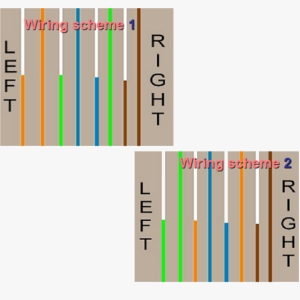
Cat5 cable uses an RJ-45 (Registered Jack-45) connector at each end of the cable with a fixed wiring scheme. The ends are then crimped on to the cable
Wiring Scheme
 |
| http://funwebpk.blogspot.com/p/computer-tip.html |
Patch or straight through cables have Wiring scheme 1 at both ends of the cable and are used to connect computers to network wall sockets or hubs.
Crossover cables have Wiring scheme 1 at one end of the cable and Wiring scheme 2 at the other. These cables are used to connect network hardware together e.g. PC to PC, hub to hub.
Protocols
A protocol (TCP/IP IPX/SPX, APPLE TALK) is a convention or standard that controls or enables the connection, communication, and data transfer between two computing endpoints. Sending and receiving systems need to use the same protocol unless a gateway service sits between networks and translates from one to the other.Most protocols specify one or more of the following properties:
- Detection of the underlying physical connection (wired or wireless), or the existence of the other endpoint or node
- Handshaking
- Negotiation of various connection characteristics
- How to start and end a message
- How to format a message
- What to do with corrupted or improperly formatted messages (error correction)
- How to detect unexpected loss of the connection, and what to do next
- Termination of the session or connectio
NetBIOS
NetBIOS is an acronym for Network Basic Input/Output System. The NetBIOS API allows applications on separate computers to communicate over a local area network. NetBIOS must be enabled for Windows File and Print Sharing to work.NetBIOS provides three distinct services:
- Name service for name registration and resolution
- Session service for connection-oriented communication
- Datagram distribution service for connectionless communication.
Session service Session mode lets two computers establish a connection for a “conversation,” allows larger messages to be handled, and provides error detection and recovery. In NBT, the session service runs on TCP port 139.
Datagram distribution service Datagram mode is “connectionless”. Since each message is sent independently, they must be smaller; the application becomes responsible for error detection and recovery. In NBT, the datagram service runs on UDP port 138.
IPX/SPX (NWLINK)
Internet work Packet Exchange (IPX) is the OSI-model Network layer protocol in the IPX/SPX protocol stack. The IPX/SPX protocol stack is supported by Novell’s NetWare network operating system. Because of Netware’s popularity through the late 1980s into the mid 1990s, IPX became a popular internetworking protocol. Novell derived IPX from Xerox Network Services’ IDP protocol. IPX usage is in general decline as the boom of the Internet has made TCP/IP nearly universal. Computers and networks can run multiple network protocols, so almost all IPX sites will be running TCP/IP as well to allow for Internet connectivity. It is also now possible to run Novell products without IPX, as they have supported both IPX and TCP/IP since NetWare reached version 5.Sequenced Packet Exchange (SPX) is a transport layer protocol (layer 4 of the OSI Model) used in Novell Netware networks. The SPX layer sits on top of the IPX layer (layer 3 – the network layer) and provides connection-oriented services between two nodes on the network. SPX is used primarily by client/server applications.
NWLink is a IPX/SPX-compatible protocol developed by Microsoft and used in its Windows NT product line.NWLink is Microsoft’s version of Novell’s IPX/SPX Protocol. The Microsoft version of NWLink includes the same level of functionality as the Novell Protocol. NWLink includes a tool for resolving NetBIOS names.NWLink packages data to be compatible with client/server services on NetWare Networks. However, NWLink does not provide access to NetWare File and Print Services. To access the File and Print Services the Client Service for NetWare needs to be installed.
AppleTalk
AppleTalk is a suite of protocols developed by Apple Computer for computer networking. It was included in the original Macintosh (1984) and is now used less by Apple in favour of TCP/IP networking.AppleTalk contains two protocols aimed at making the system completely self-configuring. The AppleTalk address resolution protocol (AARP) allowed AppleTalk hosts to automatically generate their own network addresses, and the Name Binding Protocol (NBP) was essentially a dynamic DNS system which mapped network addresses to user-readable names.
For interoperability Microsoft maintains the file services for Macintosh and the print services for Macintosh
TCP/IP
The Internet protocol suite is the set of communications protocols that implement the protocol stack on which the Internet and most commercial networks run. It is sometimes called the TCP/IP protocol suite, after the two most important protocols in it: the Transmission Control Protocol (TCP) and the Internet Protocol (IP), which were also the first two defined. The Internet protocol suite like many protocol suites can be viewed as a set of layers, each layer solves a set of problems involving the transmission of data, and provides a well-defined service to the upper layer protocols based on using services from some lower layers. Upper layers are logically closer to the user and deal with more abstract data, relying on lower layer protocols to translate data into forms that can eventually be physically transmitted. The OSI model describes a fixed, seven layer stack for networking protocols. Comparisons between the OSI model and TCP/IP can give further insight into the significance of the components of the IP suite, but can also cause confusion, as TCP/IP consists of only 4 layers.The four layers in the DOD model, from bottom to top, are:
- The Network Access Layer is responsible for delivering data over the particular hardware media in use. Different protocols are selected from this layer, depending on the type of physical network.
- The Internet Layer is responsible for delivering data across a series of different physical networks that interconnect a source and destination machine. Routing protocols are most closely associated with this layer, as is the IP Protocol, the Internet’s fundamental protocol.
- The Host-to-Host Layer handles connection rendezvous, flow control, retransmission of lost data, and other generic data flow management. The mutually exclusive TCP and UDP protocols are this layer’s most important members.
- The Process Layer contains protocols that implement user-level functions, such as mail delivery, file transfer and remote login.
Network Services
DNS (Domain Naming System)
The Domain Name System (DNS) stores and associates many types of information with domain names, but most importantly, it translates domain names (computer hostnames) to IP addresses. It also lists mail exchange servers accepting e-mail for each domain. In providing a worldwide keyword-based redirection service, DNS is an essential component of contemporary Internet use.The DNS pre-eminently makes it possible to attach easy-to-remember domain names (such as “es-net.co.uk”) to hard-to-remember IP addresses (such as 270.146.131.206). People take advantage of this when they recite URLs and e-mail addresses.
WINS (Windows Internet Naming Service)
Windows Internet Naming Service (WINS) is Microsoft’s implementation of NetBIOS Name Server (NBNS) on Windows, a name server and service for NetBIOS computer names. Effectively, it is to NetBIOS names what DNS is to domain names – a central mapping of host names to network addresses. However, the mappings have always been dynamically updated (e.g. at workstation boot) so that when a client needs to contact another computer on the network it can get its up-to-date DHCP allocated address. Networks normally have more than one WINS server and each WINS server should be in push pull replication; the favored replication model is the hub and spoke, thus the WINS design is not central but distributed. Each WINS server holds a full copy of every other related WINS system’s records. There is no hierarchy in WINS (unlike DNS), but like DNS its database can be queried for the address to contact rather than broadcasting a request for which address to contact. The system therefore reduces broadcast traffic on the network, however replication traffic can add to WAN / LAN traffic.DHCP (Dynamic Host Configuration Protocol)
The Dynamic Host Configuration Protocol (DHCP) automates the assignment of IP addresses, subnet masks, default routers, and other IP parameters. The assignment usually occurs when the DHCP configured machine boots up or regains connectivity to the network. The DHCP client sends out a query requesting a response from a DHCP server on the locally attached network. The DHCP server then replies to the client with its assigned IP address, subnet mask, DNS server and default gateway information. The assignment of the IP address usually expires after a predetermined period of time, at which point the DHCP client and server renegotiate a new IP address from the server’s predefined pool of addresses. Configuring firewall rules to accommodate access from machines who receive their IP addresses via DHCP is therefore more difficult because the remote IP address will vary from time to time. Administrators must usually allow access to the entire remote DHCP subnet for a particular TCP/UDP port. Most home routers and firewalls are configured in the factory to be DHCP servers for a home network. ISPs (Internet Service Providers) generally use DHCP to assign clients individual IP addresses.DHCP is a broadcast-based protocol. As with other types of broadcast traffic, it does not cross a router.APIPA (Automatic Private IP Addressing)
If computers are unable to pick an address up from a DHCP server they use Automatic Private IP Addressing (APIPA). This means the computer will assign itself a random address between 169.254.0.1 – 169.254.254.254/16, allowing it to communicate with other clients who are also using APIPA.Automatic Private IP Addressing (APIPA), this allows unknowledgeable users to connect computers, networked printers, and other items together and expect them to work. Without Zeroconf or something similar, a knowledgeable user must either set up special servers, like DHCP and DNS, or set up each computer by hand.
Networks
A Local Area Network (LAN) is a computer network covering a small local area, like a home, office, or small group of buildings such as a home, office, or college. Current LANs are most likely to be based on switched Ethernet or Wi-Fi technology running at 10, 100 or 1,000 Mbit/s.The defining characteristics of LANs in contrast to WANs (wide area networks) are: their much higher data rates; smaller geographic range; and that they do not require leased telecommunication lines.A Personal Area Network (PAN) is a computer network used for communication among computer devices (including telephones and personal digital assistants) close to one person. The reach of a PAN is typically a few meters and may use Bluetooth, wireless or USB for connection.
A Wide Area Network (WAN) is a computer network covering a wide geographical area, involving a vast array of computers. This is different from personal area networks (PANs), metropolitan area networks (MANs) or local area networks (LANs) that are usually limited to a room, building or campus. The most well-known example of a WAN is the Internet. WANs are used to connect local area networks (LANs) together, so that users and computers in one location can communicate with users and computers in other locations.
No comments:
Post a Comment
Thanks For Your Feedback.